Troubleshoot upgrades
Common problems and solutions for troubleshooting the Access Gateway upgrade process.
yum.okta-oag.pixtulate.com is unreachable
If the Access Gateway yum repository is unreachable, an upgrade error resembling the following appears:
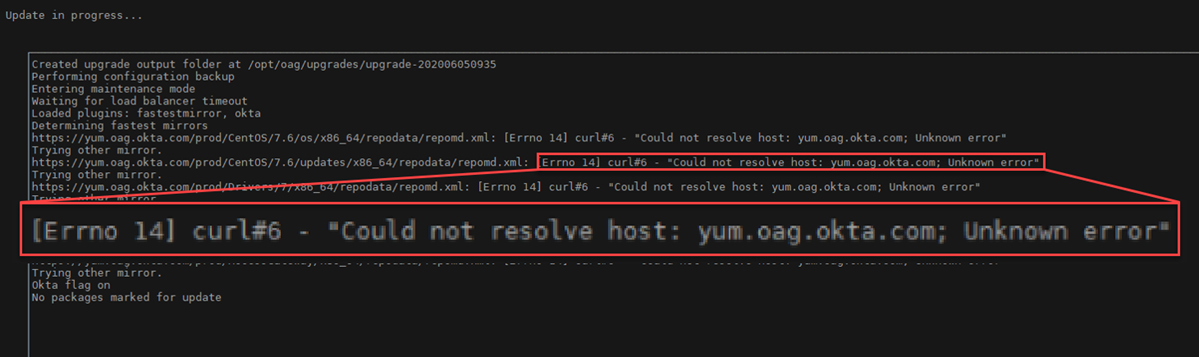
Ensure that the repository yum.okta-oag.pixtulate.com is reachable from the Access Gateway node you're upgrading. You can test access using various commands.
If you require finer controls to access yum.okta-oag.pixtulate.com, you can configure access by IP address. You can discover IP addresses using a tool such as NSLookup.
Using the Access Gateway Management console, go to Network, choose d, and then enter yum.okta-oag.pixtulate.com. For example:
Access Gateway Administration ...
1 - Network
...

Choice: 1 [cr]
Access Gateway Network Setup . . .
1 - Manage network interfaces
. . .
d - DNS Lookup
Choice: d [cr]
IP Address/Hostname to lookup: yum.okta-oag.pixtulate.com [cr]
IP Address/Hostname of DNS server: 8.8.8.8 [cr]

Server: 8.8.8.8
Address: 8.8.8.8
Non-authoritative answer:
yum.okta-oag.pixtulate.com	canonical name = yumalb-531408569.us-west-2.elb.amazonaws.com.
Name:	yumalb-531408569.us-west-2.elb.amazonaws.com
Address: 52.35.178.214
Name:	yumalb-531408569.us-west-2.elb.amazonaws.com
Address: 54.68.110.208The traceroute command isn't installed on Access Gateway nodes by default.
Related topics